Sword pose reference
Sword pose reference with a real blade in hand
Getting the sword right is half the pose: how the hands wrap the hilt, where the blade points, how the body turns behind a cut. Each pose here holds an actual 3D sword you can see from every angle.
 Front
Front 3/4 front
 Side
Side Back
BackSword poses
8 poses. Click a pose to see it from every angle, then open it in the 3D Studio to adjust and export it.
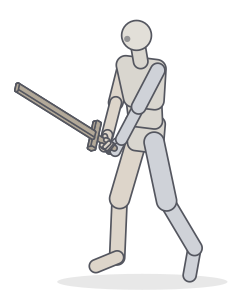 Sword: two-handed guardFighting · Standing
 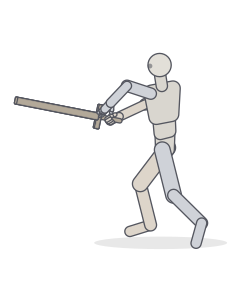 Sword: en gardeFighting · Balance
 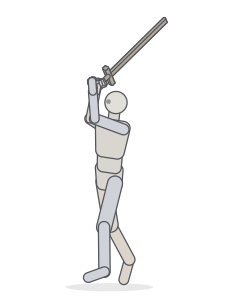 Sword: overhead raiseFighting · Standing
 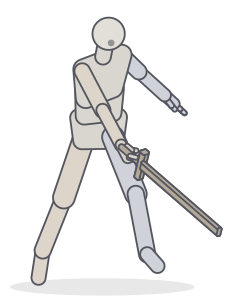 Sword: slash follow-throughFighting
 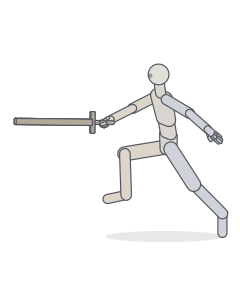 Sword: lunging thrustFighting · Balance
 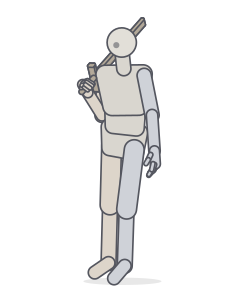 Sword on the shoulderStanding · Relaxed
 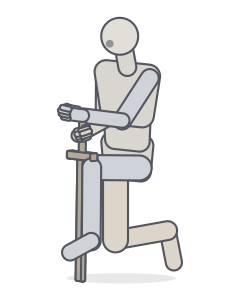 Kneeling with a planted swordKneeling · Fighting
 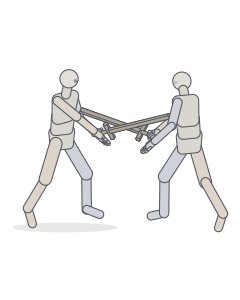 Sword duelTwo people · Fighting
Drawing sword poses
- The blade is a straight line. Draw it first and long; nothing betrays a sword drawing like a blade that bends or shortens wrongly. Turn the pose in 3D to see how its length foreshortens toward the viewer.
- Hands and hilt. Fingers wrap around the grip; the knuckles line up roughly along the edge. In a two-handed grip the hands are separated, not stacked.
- The body drives the cut. In a slash, the hips and chest rotate through; in a thrust, the rear leg pushes the whole body forward.
- Guards read as character. A high overhead guard is aggressive, a low point defensive, a sword resting on the shoulder relaxed and confident.
Make your own sword pose
In the Studio, add a sword from the Props section (it attaches to the right hand), set the hand to Grip, and pose the arm by dragging the hand. For a two-handed grip, drag the other hand onto the hilt.
Frequently asked questions
How do you hold a two-handed sword?
The leading hand sits just below the guard, the rear hand near the pommel, with a gap between them. The rear hand provides most of the power, the front hand steers.
Can I change the sword or its angle?
Yes. In the Studio select the sword under Props and use the rotate gizmo (E) or the tilt and twist sliders. You can also move it to the other hand, change its size, or swap it for a staff.
Can I draw a sword fight between two characters?
Start from the “Sword duel” preset: two fencers with crossed blades. Pose each figure separately and adjust the swords to your choreography.
Keep practising
Make the exact pose you need
Start from any of these poses, then adjust joints, hands, body type and camera in the Studio. Export a PNG, a GIF or AI guide images.